내 블로그 목록

레이블이 HTML/CSS인 게시물을 표시합니다. 모든 게시물 표시

2018년 6월 27일 수요일

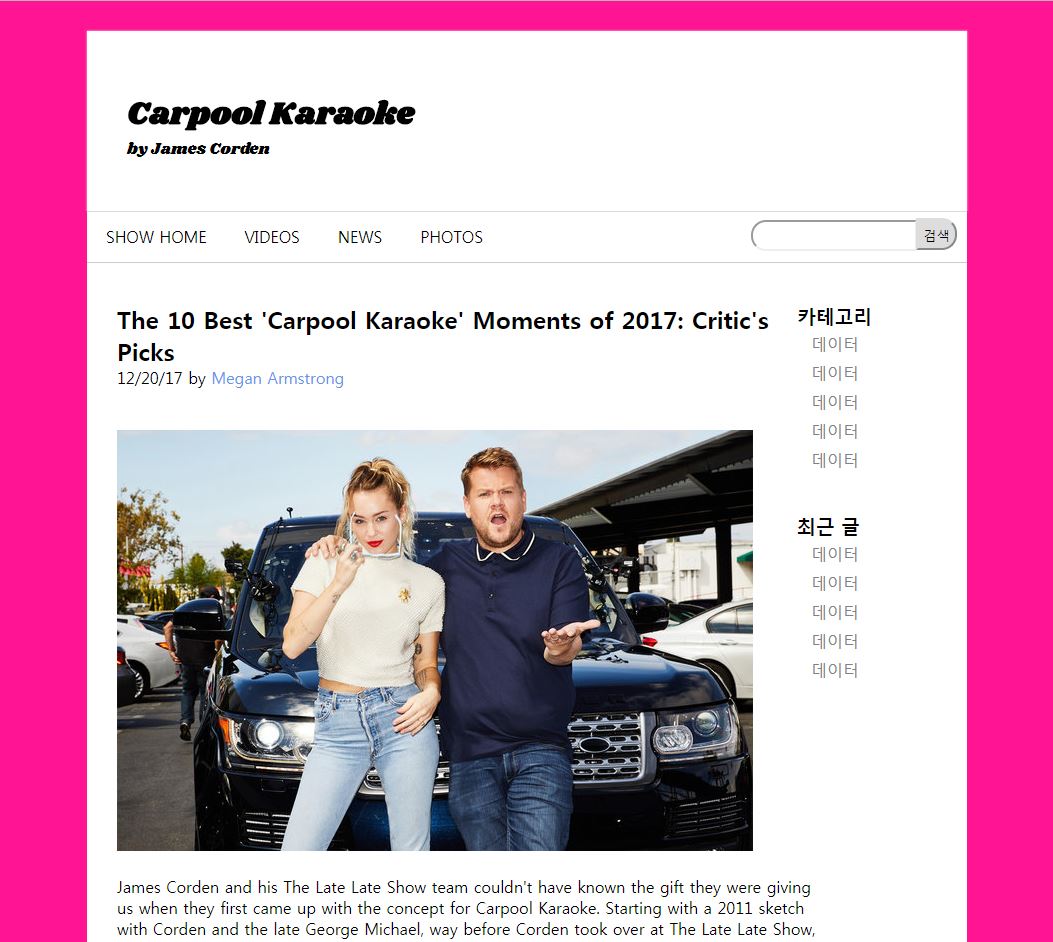
[HTML] 홈페이지 만들기 실습_CarpoolKaraoke


[홈페이지 만들기 실습]


<!DOCTYPE html>
<html>
  <head>
   <title>HTML5 Basic Page</title>
   <link href="https://fonts.googleapis.com/css?family=Shrikhand" rel="stylesheet">
   <style>
       * {
           margin: 0px;
           padding: 0px;
       }

       body {
           background-color: deeppink;
       }

       #container {
           width: 880px;
           height: 3000px;
           background-color: white;
           margin: 30px auto;
       }

       #header {
           height: 180px;
       }

       #headCont {
           position: relative;
           top: 60px;
           left: 40px;
           font-family: 'Shrikhand', cursive;

       }

       #upMenu {
           height: 50px;
           border-top: 1px solid #ccc;
           border-bottom: 1px solid #ccc;
       }

       .up_list {
           list-style: none;
           display: inline;
           padding: 14px;
           margin: 0 5px;
           float: left;
       }

       #conWrap {
           overflow: hidden;
       }

       #content {
           width: 700px;
           float: left;
       }

       #content1 {
           position: relative;
           height: 1600px;
           top: 40px;
           left: 30px;

       }

       span {
           color: cornflowerblue;
       }

       #search {
           position: relative;
           float: right;
           right: 10px;
       }

       input[type=text] {
           width: 150px;
           padding: 6px;
           border-radius: 15px 0 0 15px;
           margin: 8px 0;
       }

       input[type=submit] {
           padding: 5px;
           border-radius: 0 15px 15px 0;
           margin-left: -6px;
       }

       #sideMenu {
           width: 170px;
           height: 600px;
           float: right;
       }

       .margin {
           margin: 0px auto;
       }

       .side_list {
           list-style: none;
           display: block;
           padding: 4px;
           margin: 0 10px;

           text-decoration: none;
           color: gray;
       }

       #sideMenuIn {
           position: relative;
           top: 40px;
       }

       #sideMenuIn2 {
           position: relative;
           top: 80px;
       }
   </style>
</head>

<body>
   <div id="container" class="temp_border">

       <div id="headWrap">
           <div id="header" class="margin">
               <div id="headCont">
                   <h1>Carpool Karaoke</h1>
                   <p>by James Corden</p>
               </div>
           </div>
           <div id="upMenu" class="margin">
               <ul>
                   <li class="up_list">SHOW HOME</li>
                   <li class="up_list">VIDEOS</li>
                   <li class="up_list">NEWS</li>
                   <li class="up_list">PHOTOS</li>
               </ul>

               <div id="search">
                   <input type="text">
                   <input type="submit" value="검색">
               </div>

           </div>
       </div>

       <div id="content" class="margin">
           <div id="content1">
               <h2>The 10 Best 'Carpool Karaoke' Moments of 2017: Critic's Picks</h2>
               <p>12/20/17 by <span>Megan Armstrong</span><p/><br><br>
                   <img src="img1.jpg"><br><br>
                   <p>James Corden and his The Late Late Show team couldn't have known the gift they were giving us when they first came up with the concept for Carpool Karaoke. Starting with a 2011 sketch with Corden and the late George Michael, way before Corden took over at The Late Late Show, Carpool Karaoke has become a worldwide platform for artists of all stripes to shine.</p>
                   <p>In 2017, Carpool Karaoke launched as a spinoff series through Apple Music. Throughout this year, across its two incarnations, we have all been witness to candid moments with music royalty such as Bruno Mars, Ed Sheeran, Harry Styles, Miley Cyrus and more.</p>
                   <p>Here are 10 of this year's best moments in Corden's car.</p>
               
           </div>
       </div>
       <div id="sideMenu" class="margin">
           <div id="sideMenuIn">
               <h3>카테고리</h3>
               <a href="#" class="side_list">데이터</a>
               <a href="#" class="side_list">데이터</a>
               <a href="#" class="side_list">데이터</a>
               <a href="#" class="side_list">데이터</a>
               <a href="#" class="side_list">데이터</a>
           </div>

           <div id="sideMenuIn2">
               <h3>최근 글</h3>
               <a href="#" class="side_list">데이터</a>
               <a href="#" class="side_list">데이터</a>
               <a href="#" class="side_list">데이터</a>
               <a href="#" class="side_list">데이터</a>
               <a href="#" class="side_list">데이터</a>
           </div>

       </div>
   </div>
</body>
</html>

[HTML] Poistion:absolute/relative 실습


<Position: absolute> - 기준이 되는 고정위치 지정
<Position: relative> - wrap으로 감싸서 원하는 부분에서만 보여주기
<!DOCTYPE html>
<html>
   <head>
       <title>Position 속성</title>
       <style>
           .box{
               width:100px;
               height:100px;
               border: 1px solid #000000;
               position: absolute;  /*blue 하나로 겹쳐짐*/
           }
           
           #apple{
               background-color: hotpink;
               top: 50px;  /*absolute에서 50px 떨어지게*/
               left: 50px;
               z-index:10000000;
           }
           
           #banana{
               background-color: greenyellow;
               top: 100px;
               left: 100px;
               z-index:100;
           }
           
           #car{
               background-color:blue;
               top:150px;
               left: 150px;
               z-index:1;
           }
           
           #wrap{
               border: 2px solid #666666;
               
               width: 400px;
               height: 200px;
               
               position: relative;
               
               overflow: auto;
           }
           
           #apple:active{
               bottom: 80px;
               left: 80px;
           }
           
           #banana:active{
               right:0px;
               top: 50px;
           }
           
           #car:active{
               right: 50px;
               top: 80px;
           }
           
           
       </style>
   </head>
   <body>
       <h1>Hey Baby</h1>
       <div id="wrap">
           <div id="apple" class="box"></div>
           <div id="banana" class="box"></div>
           <div id="car" class="box"></div>
       </div>
       <h1>It's me</h1>
   </body>
</html>